Code
import numpy as np
import matplotlib.pyplot as plt
fig, ax = plt.subplots() # Create a figure containing a single axes.
ax.plot([1, 2, 3, 4], [1, 4, 2, 3]); # Plot some data on the axes.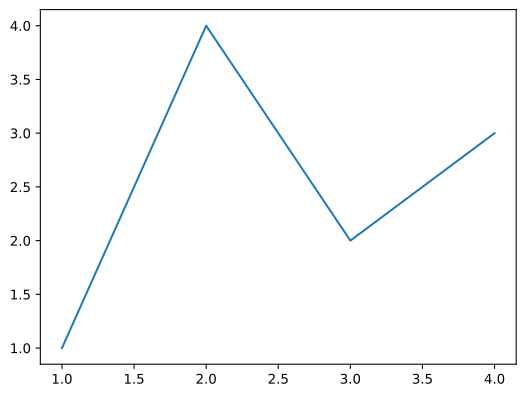
使用quarto输入代码
x = 1
print(x)
library(ggplot2)
data(mpg, package="ggplot2")
# Scatterplot
theme_set(theme_bw()) # pre-set the bw theme.
mpg_select <- mpg[mpg$hwy >= 35 & mpg$cty > 27, ]
g <- ggplot(mpg, aes(cty, hwy)) +
geom_count() +
geom_smooth(method="lm", se=F)
g\[ x^2+y^2=1 \]
行内公式:\(x=1\)
import numpy as np
import matplotlib.pyplot as plt
fig, ax = plt.subplots()  # Create a figure containing a single axes.
ax.plot([1, 2, 3, 4], [1, 4, 2, 3]);  # Plot some data on the axes.
在quarto的blog建立中,我们可以使用.ipynb文件导入,可直接显示。
#导入库文件
import numpy as np
import matplotlib.pyplot as pltr = np.arange(0,2,0.01)
theta = 2*np.pi*r
fig, ax = plt.subplots(subplot_kw={'projection':'polar'})
ax.plot(theta,r)
ax.set_rticks([0.5,1,1.5,2])
ax.grid(True)
plt.show()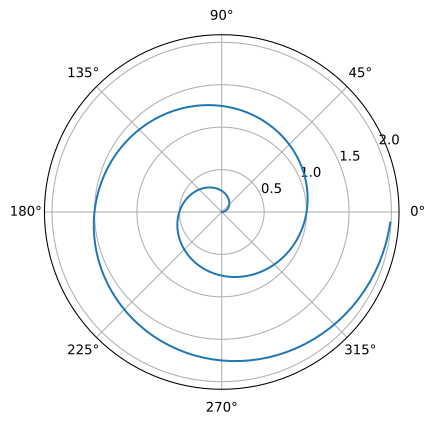
在ipynb中我们还可以借助于quarto编译系统,我们可以进行相应的一些变化。在其中添加#|来设置输出图片的形式。包括fig-cap图片的标题设置,和标签设置,标签就可以帮助我们引用该输出图片。
交叉引用格式为@fig-polar :Figure 1
不得不承认的是,在一些方面,quarto的使用体验会好于Rmarkdown和pandoc。