from mpl_toolkits.mplot3d import Axes3D
from sklearn.preprocessing import StandardScaler
import matplotlib.pyplot as plt # plotting
import numpy as np # linear algebra
import os # accessing directory structure
import pandas as pd # data processing, CSV file I/O (e.g. pd.read_csv)
import seaborn as sns
pd.options.display.float_format = '{:,.2f}'.format
pd.options.display.max_columns = 999seaborn可视化:使用德国银行信用数据
df1 = pd.read_csv("/Users/a182501/datas/german_credit_data.csv")
df1.shape
(1000, 10)df1.head()| Unnamed: 0 | Age | Sex | Job | Housing | Saving accounts | Checking account | Credit amount | Duration | Purpose | |
|---|---|---|---|---|---|---|---|---|---|---|
| 0 | 0 | 67 | male | 2 | own | NaN | little | 1169 | 6 | radio/TV |
| 1 | 1 | 22 | female | 2 | own | little | moderate | 5951 | 48 | radio/TV |
| 2 | 2 | 49 | male | 1 | own | little | NaN | 2096 | 12 | education |
| 3 | 3 | 45 | male | 2 | free | little | little | 7882 | 42 | furniture/equipment |
| 4 | 4 | 53 | male | 2 | free | little | little | 4870 | 24 | car |
df1.describe()| Unnamed: 0 | Age | Job | Credit amount | Duration | |
|---|---|---|---|---|---|
| count | 1,000.00 | 1,000.00 | 1,000.00 | 1,000.00 | 1,000.00 |
| mean | 499.50 | 35.55 | 1.90 | 3,271.26 | 20.90 |
| std | 288.82 | 11.38 | 0.65 | 2,822.74 | 12.06 |
| min | 0.00 | 19.00 | 0.00 | 250.00 | 4.00 |
| 25% | 249.75 | 27.00 | 2.00 | 1,365.50 | 12.00 |
| 50% | 499.50 | 33.00 | 2.00 | 2,319.50 | 18.00 |
| 75% | 749.25 | 42.00 | 2.00 | 3,972.25 | 24.00 |
| max | 999.00 | 75.00 | 3.00 | 18,424.00 | 72.00 |
df1.isnull().sum()Unnamed: 0 0
Age 0
Sex 0
Job 0
Housing 0
Saving accounts 183
Checking account 394
Credit amount 0
Duration 0
Purpose 0
dtype: int64df1['Sex'].value_counts()
df1['Credit amount'].describe()count 1,000.00
mean 3,271.26
std 2,822.74
min 250.00
25% 1,365.50
50% 2,319.50
75% 3,972.25
max 18,424.00
Name: Credit amount, dtype: float64df1.groupby('Job')['Credit amount'].mean()Job
0 2,745.14
1 2,358.52
2 3,070.97
3 5,435.49
Name: Credit amount, dtype: float64sns.countplot(data=df1, x='Job', hue='Sex')
plt.title("Count of Job Class on Sex", size=15)
plt.xlabel("Job Class", size=15)
plt.ylabel("Count", size=15)
plt.show()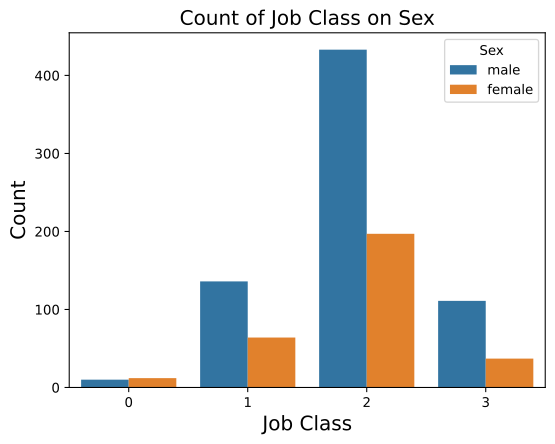
其中的hue也是对变量的填充,是对分类变量的填充,同时sns中还包括其他一些参数 - order、hue_order:绘制类别变量的顺序,若没有,则会从数据对象中推断绘图顺序; - estimator:统计函数中用于估计的值 - ci:表示的是置信区间的大小 - orient:v或h,对坐标轴的设置;
sns.lmplot(data=df1, x='Credit amount', y='Job', hue='Sex')

plt.title("Credit amount on Job", size=15)
plt.xlabel("Credit amount", size=15)
plt.ylabel("Job Class", size=15)

plt.show()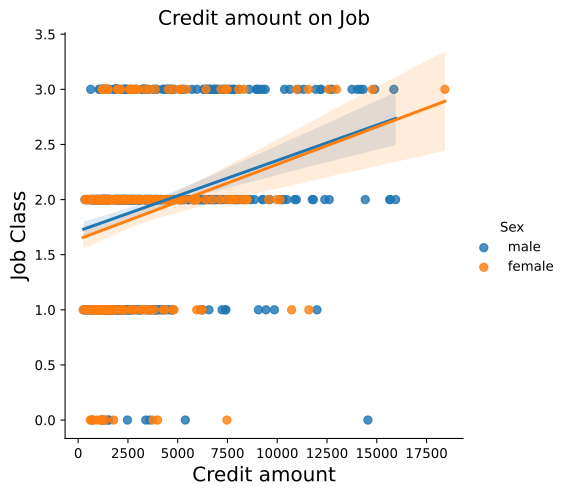
sns.countplot(data=df1, x='Checking account', hue='Sex')

plt.title("Checking account on Sex", size=15)
plt.xlabel("Checking Account", size=15)
plt.ylabel("Count")

plt.show()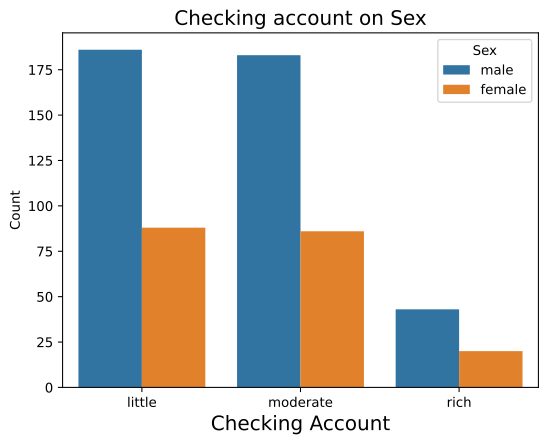
这里就将原有的hue顺序进行调换
sns.countplot(data=df1, x='Checking account', hue='Sex',hue_order=['female','male'],palette="Blues_d",saturation=0.9)


plt.title("Checking account on Sex", size=15)
plt.xlabel("Checking Account", size=15)
plt.ylabel("Count")

plt.show()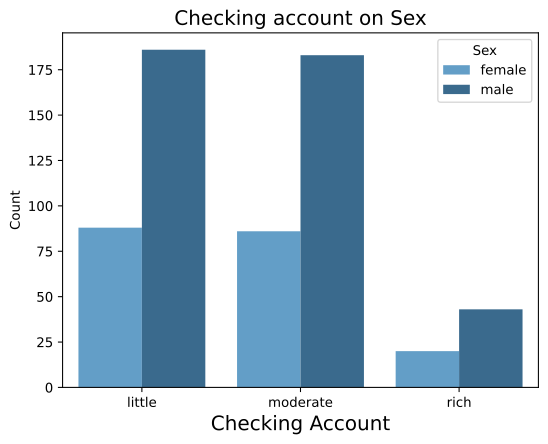
palette="Blues_d"可对现有的色彩管理进行调整。saturation=0.2调整的是现有的颜色饱和度。
sns.regplot(data=df1, x='Credit amount', y='Duration')

plt.title("Relation between Credit Amount and Duration", size=15)
plt.xlabel("Credit Amount", size=15)
plt.ylabel("Duration", size=15)

plt.show()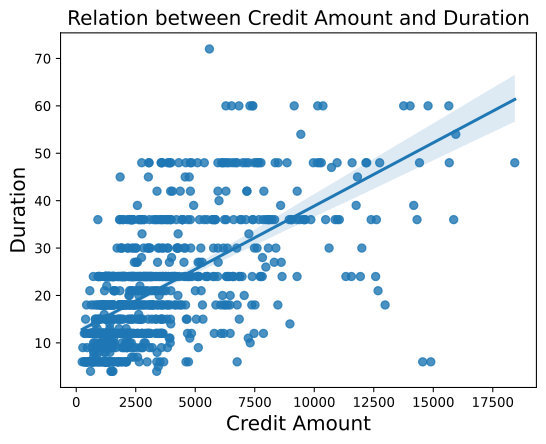
sns.barplot(data=df1, x='Duration', y='Purpose', hue='Sex',ci=99)

plt.title("Purpose on Duration by Sex", size=15)
plt.xlabel("Duration", size=15)
plt.ylabel("Purpose", size=15)

plt.show()
/var/folders/sn/g01cvq2j72j6tbq2pmmm074h0000gq/T/ipykernel_58568/1764674419.py:1: FutureWarning:
The `ci` parameter is deprecated. Use `errorbar=('ci', 99)` for the same effect.
sns.barplot(data=df1, x='Duration', y='Purpose', hue='Sex',ci=99)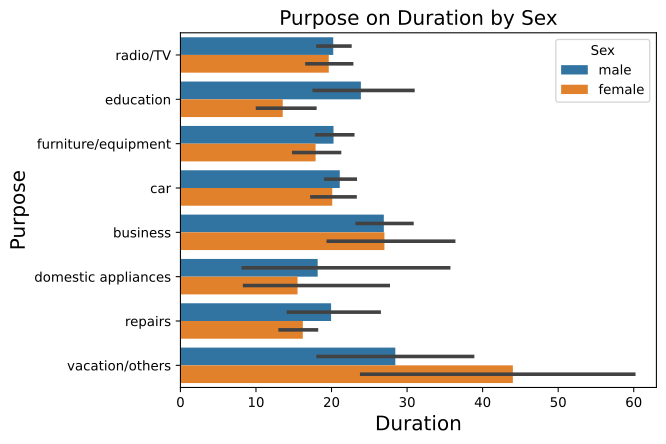
其中的黑色条为误差项,默认为ci=95